


Short answer: Your data is clean enough to migrate into a CRM when it can run your day-one business processes: required fields populated, duplicates controlled, values standardized, and record relationships intact, confirmed by a migrated sample that real users approve. Aim for fitness for use, not perfection.
"Perfect data" is the standard that stalls migrations for months, because source data is never perfect and chasing it is a losing game. The useful standard is fitness for use: can your team operate correctly the morning after go-live? If a migrated sample says yes, you are ready. If it says no, you have targeted cleanup to do first.
This guide gives RevOps owners a practical way to make that call, drawn from how we scope every HubSpot data migration: the readiness test, the six dimensions to measure, the thresholds and scorecard to grade yourself against, what to leave behind, and the mock migration that turns a debate into a decision.
Why "Clean Enough" Is a Business Question, Not Just a Technical One
The cost of getting this wrong is well documented. Gartner estimates that poor data quality costs organizations an average of $12.9 million a year. B2B data also decays quickly: ZoomInfo and other industry research put the annual decay rate around 20–30% as people change roles and companies fold.
And when revenue data lives somewhere other than the customer record, work slips through the cracks; HubSpot's State of B2B Revenue Report found that 76% of revenue leaders miss renewals for exactly that reason.
So the question underneath "is our data clean enough?" is really a question about trust and day-one operations. As Zach Caputo, Growth's Director of Client Success and Delivery, put it in our breakdown of how HubSpot migrations succeed or fail:
"A CRM migration scoped correctly from the start is a 90-day project with a clean outcome. A migration scoped incorrectly is a multi-year data quality problem."
— Zach Caputo, Director of Client Success and Delivery, Growth
Key Takeaways
- "Clean enough" is a fitness test. Your data is ready when it supports day-one workflows, reporting, and routing in the new CRM.
- Measure six dimensions: completeness, validity, uniqueness, consistency, relationships, and relevance. Weak spots on operational fields are what break adoption.
- Grade yourself against thresholds: roughly 95%+ completeness on required fields, under 2–3% duplicates on priority objects, and near-zero broken links on active records.
- Clean before you migrate. In most cases, it is far cheaper to fix data in a flat file than inside a live, relational CRM.
- Prove it with a mock / test migration. Load a representative sample into a sandbox, run reports and workflows, and have real users validate it.
- Leave junk behind on purpose. A migration is the best moment to retire stale contacts, dead deals, and fields no one uses. It feels good too.
The Day-One Readiness Test
We call the governing principle the Day-One Readiness Test: your data is clean enough to migrate when a representative sample, loaded and configured exactly as you plan to run it, lets real users do their jobs on day one. Everything else in this guide feeds that single test.
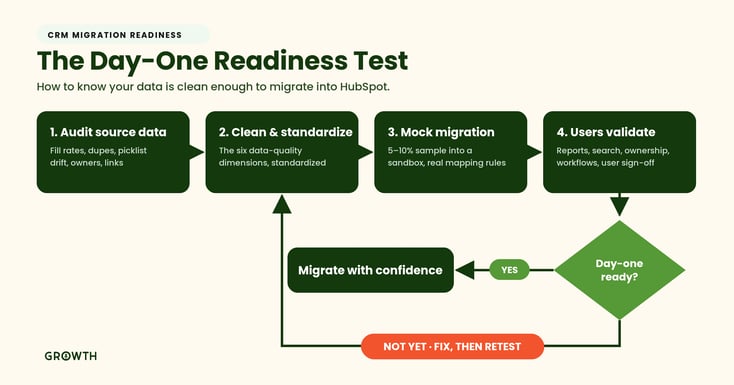
The rest of this article walks each step: what to audit, the thresholds to hit, what to exclude, and how to run the validation that settles it.
The Six Dimensions of Migration-Ready Data
Clean single records are not enough, because a CRM is relational. A contact that looks perfect is still a problem if it is linked to the wrong company or owned by a user who left last year. Audit your source data across these six dimensions, and weight your effort toward the fields and objects your team touches every day.
1. Completeness. Are the must-have fields populated? For each object, define what "required" means and measure the fill rate. Contacts need a name and a usable email or phone. Companies need an owner, segment, and status. Deals need an amount, stage, close date, and a valid account and owner.
2. Validity. Do values match the format and rules the CRM expects? Think valid email structures, real picklist values, dates in a consistent format (for example, YYYY-MM-DD), phone numbers in a standard pattern (E.164), and owner IDs that map to active users. Invalid values cause imports to fail or drop silently into the wrong place.
3. Uniqueness. Duplicates are the quiet killer of CRM trust. You do not need zero duplicates, but you do need a defined dedupe strategy, clear survivorship rules for which record wins, and a rate low enough that reps keep believing the system. Exact duplicates should be mostly gone before import; fuzzy duplicates on your top accounts deserve a human review.
4. Consistency. The same concept should appear one way, not four. "VP Sales," "Vice President of Sales," and "V.P. Sales" all need to resolve to a single standardized value. Lifecycle stages, states, countries, currencies, and phone formats should be normalized before anything moves. Any field used to filter, route, score, or automate has to be standardized first, or the automation you build on top of it will misfire.
5. Relationships (referential integrity). Contacts tied to the right accounts, deals linked to valid contacts and companies, parent-child hierarchies handled consistently, and historical activities connected where they still matter. Broken associations are hard to spot in a spreadsheet and painful to repair once they are loaded into workflows and reports.
6. Relevance and timeliness. Data decays, so a migration is your chance to prune. If a record has not engaged in two-plus years and carries no operational reason to exist, it does not belong in the active CRM. Keep it in a backup file if you must, and keep it out of the portal your team works from.
How HubSpot Helps You Measure and Dedupe
Once records are in, HubSpot gives you a running read on several of these dimensions.
-
The data quality command center surfaces formatting issues and duplicate records
-
HubSpot's built-in deduplication uses email for contacts and domain for companies to catch duplicates
-
The import tool enforces some validity rules on the way in.
For pre-migration cleanup in the source file, teams also lean on dedicated tools; some we know are used in the market for deduplication and email validation include Insycle, Cloudingo, and ZeroBounce. Most of the heavy lifting, though, typically happens in the flat file before import, which is where cleanup is usually cheapest in terms of time and effort.
The Readiness Thresholds at a Glance
No benchmark is universal, but these targets hold up well across the migrations we run. Track them per object, and focus on the fields that drive day-one operations rather than chasing every column.
| Metric | What it measures | Working threshold |
|---|---|---|
| Completeness | % of required fields populated | 95%+ on critical fields, 90%+ on important ones |
| Validity | % of records matching format and picklist rules | Invalid values under 2–5% |
| Uniqueness | Duplicate rate on priority objects | Under 2–3% |
| Consistency | % of values conforming to one taxonomy | High on any field used to filter, route, or automate |
| Referential integrity | % of active records with valid links | Near zero broken links on active records |
| Deliverability | Email bounce rate on migrated contacts | Under 2–3% |
The Day-One Readiness Scorecard
Turn those thresholds into a go/no-go. Score each priority object you plan to migrate (usually Contacts, Companies, and Deals) against the five review gates below.
Pass all five, plus the sign-off gate, and you are in migration-ready territory.
| # | Gate | You pass when… | Pass? |
|---|---|---|---|
| 1 | Completeness | Required fields are 95%+ populated | ☐ |
| 2 | Validity | Invalid emails, dates, and picklist values are under ~5% | ☐ |
| 3 | Uniqueness | Duplicates are under 2–3% and survivorship rules are defined | ☐ |
| 4 | Consistency | Every field used to route, score, or automate is standardized | ☐ |
| 5 | Relationships | Active records have valid associations and active owners | ☐ |
| ★ | Sign-off | Business users approve a migrated sample as usable | ☐ |
This gives you five gates plus a final sign-off. Anything that gets flagged at a given gate? That is your cleanup list. Rank and prioritize by which item most stands in the way of day-one readiness.
What Data Should You Leave Behind?
"How do we decide what should and shouldn't come over?" is one of the most common questions we get from clients scoping a move, and it is usually one of the most valuable conversations in the project. We believe that a smaller set of variables, values and data set - that is trusted and usable in the CRM - beats a bloated one with "everything we've ever known to date" every time.
We recommend you plan to exclude or archive:
- Bounced and unsubscribed contacts with no operational reason to migrate
- Stale leads with no activity for years
- Closed-lost deals aged beyond what you need for reporting history (maybe 10 years back is too far? Maybe 30 is?)
- Custom fields and properties nobody uses anymore (check the number of records that have values in any of them)
- Duplicate notes, dead tasks (these often just don't get checked off or removed by reps)
- Orphaned records (if they have no owner or parent account, many companies leave these behind, at least initially)
What this looks like in action
-
On a recent Zoho-to-HubSpot migration, our team merged redundant legacy fields (two versions of the same "Service" property) into one clean field and we deliberately excluded fields holding low-quality ad-tracking data that the client had no trust in using for their segments.
-
On another migration off a legacy platform, we trimmed a 215-property export by deleting deprecated fields and consolidating duplicates into a lean, functional model.
Bringing a field over "just in case" is how a fresh portal inherits its predecessor's clutter. If a field has no job in the new CRM, it should not make the trip.
How Do You Actually Prove It? Run a Mock Migration.
Don't debate readiness in the abstract. Test it. A mock migration is the single most reliable way to know whether your data is clean enough, and it is the step inexperienced teams skip.
Here is the sequence we run:
- Extract a representative sample. Pull roughly 5–10% of records across the objects that matter: accounts, contacts, deals, activities.
- Transform it exactly as planned. Apply the real mapping and transformation rules, not a simplified version.
- Load it into a sandbox. Never test for the first time in your live, production portal, if you can avoid it.
- Exercise the system. If you can, actually run reports, test search for records, check ownership rules, fire a workflow, and confirm permissions. This is your unit testing and data-integrity testing rolled into one: find the rows that failed and understand why.
- Have real users validate it (UAT). Can a rep find the right account fast? Do the numbers roughly match what leadership expects? Would your team actually work from this?
- Log every issue by severity. If the critical issues are limited and fixable, your data is clean enough. If business users say "I wouldn't work from this," it isn't yet.
That last check is the one that counts. Adoption lives or dies on whether the people expected to use the system recognize the migrated records as usable.
Red Flags That Mean "Not Yet"
Pause the migration if you see these, because each one tends to multiply once it is loaded into a relational system:
- Multiple systems disagree on who owns an account or customer
- Stage and status values are chaotic across the source data
- Duplicate accounts are common among your top customers
- Required fields are slated to be "backfilled later"
- Active users can't be mapped cleanly to CRM owners
- No single person owns data-quality decisions
- The plan is to migrate everything "just in case"
None of these are fatal. In our experience, all of them are typically cheaper to fix in a flat data file, before migration, than inside HubSpot afterward.
What We See Across Our Own Migrations
The pattern in our work is consistent: the projects that reach adoption fastest are the ones that cleaned data to a day-one-fit standard before cutover, then proved it on a sample.
That discipline is measurable.
-
Across our flagship migrations, Growth has moved compliance-grade data at 99.8% accuracy.
-
Our largest was a nonprofit migration of more than 256,000 records carrying data debt back to 1992, where staff adoption went from 0 to 100% after go-live. You can see that work in the Gateway for Cancer Research transformation
-
In a Salesforce-to-HubSpot context, such as in FourBlock's migration, we found proper data planning and customization allowed them cut manual admin work in their new CRM by 70%.
The opportunities for failure are still out there. It shows up 90+ days later, when reporting gets fuzzy and a few reps have drifted back to their spreadsheets. That is why we treat migration as a data-quality project first and a data-transfer exercise second.
Moving dirty data faster only gives you dirty data sooner. (The same dynamic sinks implementations broadly, which we cover in why most HubSpot implementations fail.)
How Growth Approaches Data Readiness
Our work starts with discovery before delivery. Before anyone touches a record, we audit the source environment:
-
fill-rate variance by object
-
picklist drift
-
owner gaps from inactive users
-
association coverage on older records.
That audit shapes what gets cleaned, what gets mapped to a custom object, and what gets left behind. Then we validate aggressively, with staged sample migrations, documented mapping and transformation rules, and QA evidence at each phase.
It is the same methodology that earned Growth HubSpot's CRM Data Migration Accreditation.
That approach fits if you want clean data, stable reporting, and a CRM your revenue team will actually use. It is a poor fit if you just want the cheapest pair of hands to bulk-import a CSV and move on.
In Conclusion
Your data is clean enough to migrate when it can carry your team through day one: required fields populated, duplicates controlled, values standardized, relationships intact, and a migrated sample that real users approve. Grade yourself against the scorecard, clean what blocks the work, leave the junk behind, and prove it with a mock migration before you commit.
If you're scoping a move to HubSpot and want an experienced read on whether your data is ready, we're glad to look at it with you.
→ Book a free migration readiness consultation
FAQs: Is Our Data Clean Enough to Migrate?
How clean does data need to be before a CRM migration?
Clean enough to run your day-one processes. That generally means required fields above 95% complete, invalid values under 2–5%, duplicates under 2–3% on priority objects, and valid relationships on active records, all confirmed by a migrated sample that business users approve.
What percentage of records should be complete before migrating?
Aim for 95%+ completeness on critical fields such as email or company name, and 80%+ on important secondary fields that drive routing or automation. Nice-to-have fields can be deferred.
How many duplicate records are acceptable?
You don't need zero, but keep the duplicate rate under roughly 2–3% on priority objects. More important than the number is having a defined dedupe strategy and clear survivorship rules for which record wins.
Should I clean data before or after migrating?
Before. It is far cheaper to fix data in a flat file than inside a live, relational CRM where the same errors are now tied to workflows, lists, and reports.
How do I test whether my data is migration-ready?
Run a mock migration. Load a 5–10% sample into a sandbox using your real mapping rules, then test reports, search, ownership, and workflows, and have real users validate the results. If critical issues are limited and fixable, you're ready.
What data should I not migrate?
Bounced and unsubscribed contacts with no operational use, leads with years of no activity, closed-lost deals beyond your reporting needs, and custom fields nobody uses. A smaller, trusted CRM outperforms a bloated one.
Who should own data-quality decisions during a migration?
One accountable owner, usually the RevOps lead, supported by the people who live in the data. "No one owns it" is itself a red flag that the migration isn't ready to start.