


Answer summary
HubSpot lifecycle stages are ready for automation when each stage has one business definition, one accountable owner, an observable entry rule, and a tested exception path. Before turning on workflows or automatic sync, marketing, sales, and service should classify representative records the same way and agree on what happens when data is missing, associations conflict, or a record needs to move backward.
Key takeaways
- Define lifecycle stages as durable business states, not campaign labels, lead activities, or reporting shortcuts.
- Assign one owner to approve definitions, exceptions, and changes across marketing, sales, and service.
- Inventory every setting, workflow, form, import, integration, and association that can update Lifecycle stage.
- Test representative records, edge cases, re-enrollment, and reversal behavior before activating automation at scale.
- Keep manual overrides, monitoring, and rollback rules visible so automation cannot hide a weak operating model.
What does lifecycle-stage readiness mean?
Lifecycle-stage readiness means the model works as an operating agreement among all the users on your team, before HubSpot enforces it.
HubSpot uses lifecycle stages to categorize contacts and companies within marketing and sales processes and to make handoffs easier to understand. That gives the property broad reach. Teams may use it in routing, segmentation, automation, reporting, and integrations. A loose definition therefore creates more than a reporting problem; it sends inconsistent instructions through the revenue system.
Automation does not settle disagreement. It makes the chosen definition (rightly or wrongly) happen faster. If marketing treats a content download as a Marketing Qualified Lead while sales requires an accepted handoff, a workflow can enforce only one of those positions. The team must decide which business event the stage represents before it decides which property value or workflow should set it.
A practical readiness test is simple: give marketing, sales, service, and operations the same representative records without showing the current lifecycle value. If they reach the same classification for the same reason, the model may be ready to automate. If they disagree, keep the workflow off and resolve the operating decision first.
Which five gates should the team pass?
The team is ready only when it can pass the definition, ownership, data, workflow-behavior, and adoption gates together.
| Gate | Pass condition | Evidence to review | Stop sign |
|---|---|---|---|
| Definition | Every stage represents one durable business state with observable entry and exit rules. | Stage dictionary and sample-record classification. | Two reviewers classify the same evidence differently. |
| Ownership | One person can approve rules, exceptions, and changes. | Named owner, contributors, and decision log. | Multiple teams can change the model without one final decision-maker. |
| Data | Every transition relies on complete, trusted, timely properties or associations. | Source inventory, field profile, and exception sample. | A required trigger is routinely blank, late, duplicated, or overwritten. |
| Workflow behavior | Normal, exception, re-enrollment, and reversal paths produce expected outcomes. | Test matrix, workflow preview, and dependency map. | The workflow works only on the happy path. |
| Adoption | Users know what the stage means and how to correct or escalate it. | Enablement notes, override rule, and monitoring owner. | Teams work around the field because they do not trust it. |
Create a one-page, five-gate lifecycle-stage automation readiness scorecard beside this table. Show Definition, Ownership, Data, Workflow Behavior, and Adoption as five filled gates with one pass condition and one stop sign each.
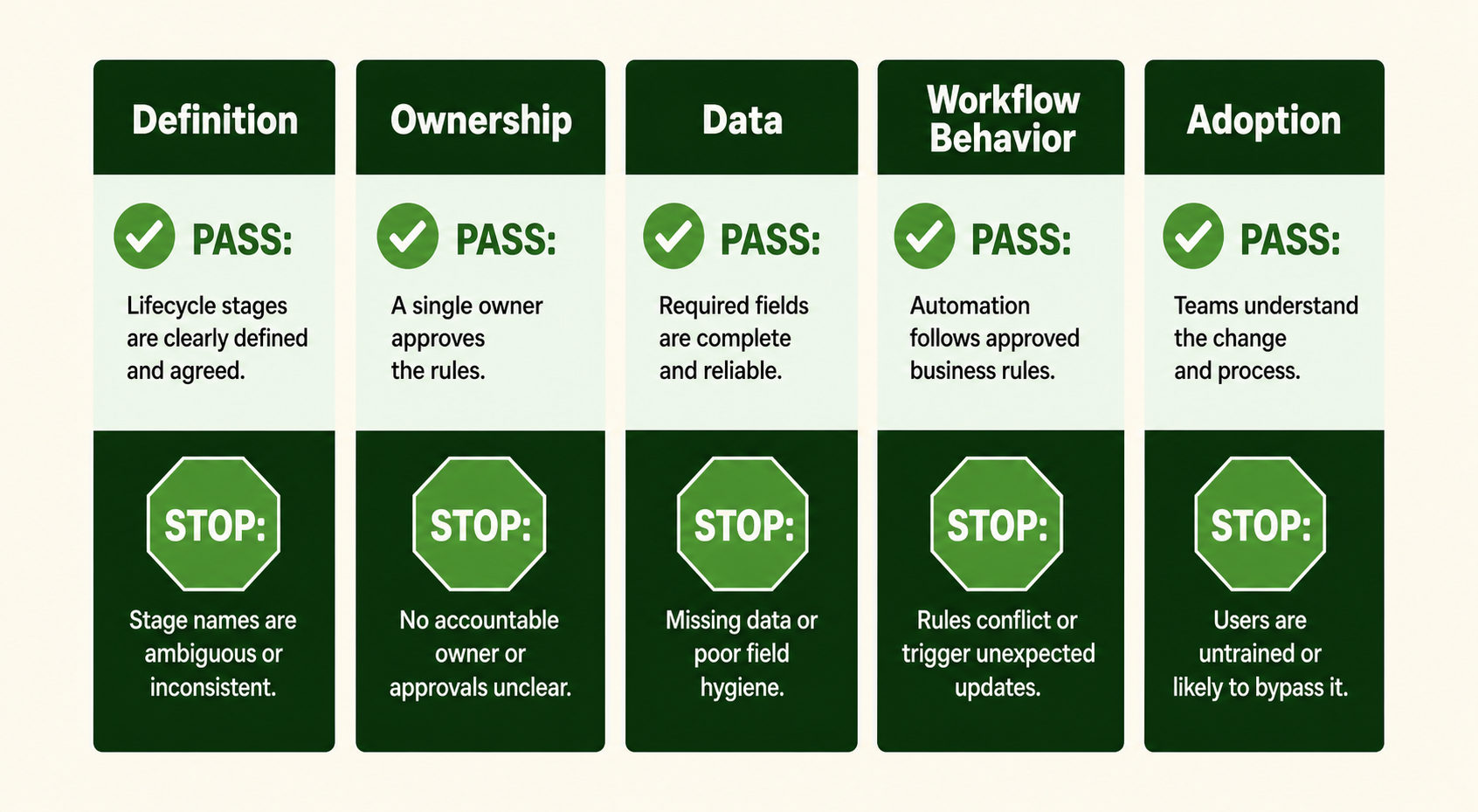
A simple visual to demonstrate the gates and criteria your scorecard should be checking
Passing four out of five gates is not close enough. A sound workflow built on weak definitions still produces wrong classifications. Clean data without ownership degrades after the next campaign, integration, or process change. The gates work as a system because lifecycle stage is both a technical property and a cross-team commitment.
Gate 1: Are the stage definitions specific enough?
Definitions are specific enough when each stage describes a durable business state and two trained reviewers can apply it consistently.
HubSpot includes default lifecycle stages and allows teams to customize them. The labels are a starting point, not a substitute for the company's qualification and customer rules. A useful stage dictionary answers four questions:
- What business state does this stage represent?
- Which observable event or evidence moves a record into it?
- Which activity looks similar but must not move the record?
- Which later event, correction, or exception can move it out?
Avoid definitions that depend on intent no one can observe. “Engaged,” “good lead,” and “sales-ready” sound clear until two teams must classify the same record. Replace them with evidence: an accepted qualification, a booked meeting that meets defined criteria, an associated open deal, or a closed-won customer record.
Keep lifecycle stage separate from narrower signals. Campaign membership describes a marketing interaction. Lead Status gives sales a more detailed view inside the Sales Qualified Lead stage. Deal stage tracks an opportunity. Those fields can inform a lifecycle decision, but they should not become interchangeable names for the same concept.
Gate 2: Is one owner accountable for the model?
One revenue operations owner should hold final accountability for lifecycle-stage rules, even though every customer-facing team contributes.
Marketing should define the evidence it can reliably create. Sales should define the handoff it will accept. Service or customer success should define when the relationship becomes and remains a customer. The HubSpot administrator should explain what the platform and connected systems can enforce. One owner then resolves conflicts and approves the operating rule.
The ownership record does not need to become a governance project. For each transition, capture the decision owner, contributing teams, trigger, exceptions, and last review date. Add a short change note when the rule changes. That is enough to answer the question that appears during every incident: was the record wrong, or did the workflow follow an outdated rule correctly?
Access should follow the same model. A small group may maintain lifecycle settings and workflows, while frontline users retain a documented correction or escalation path. The goal is not to lock people out. It is to prevent an unreviewed local fix from silently changing global reporting and automation.
Gate 3: Is the source data trustworthy enough?
This data gate passes when each automatic transition depends on a source that is complete, timely, and authoritative for that decision.
HubSpot can set lifecycle stages in several ways. Account settings can assign a default stage to newly created records. Associations and deal events can update stages. Workflows and connected apps can also write the property. HubSpot's automatic lifecycle-stage settings include company-to-contact sync through the primary company association, but the contact's value does not update the company in the opposite direction.
That asymmetry matters. A contact connected to several companies may inherit the primary company's state even when the person's relationship is more complicated. A closed-won deal may be the right customer signal in one business and premature in another. A form default may fill a blank cleanly but collide with a more authoritative integration later.
Build a source inventory before writing enrollment criteria:
- Which setting, workflow, form, import, API, or app can write Lifecycle stage?
- Which business event does each path represent?
- Which object and association carry the decision?
- What happens when the trigger property is blank or late?
- What happens after a merge, association change, or integration retry?
- Which source wins when two paths disagree?
Then inspect representative records from every source. Do not use a single completeness percentage as permission to automate. A field can be 98 percent complete and still fail if the missing two percent contains the highest-value or most complex records. Evaluate whether the data is fit for this transition and whether the exceptions have a safe route.
Gate 4: Does the automation survive exceptions?
The workflow gate passes when normal records, edge cases, re-enrollment, and backward corrections all behave as intended.
HubSpot's default lifecycle automation moves stages forward. HubSpot also documents that forms, imports, APIs, chatflows, workflows, and the Salesforce integration generally cannot set the default Lifecycle stage property backward unless the existing value is cleared first. A workflow designed as if the property were freely reversible will fail at the exact moment an operator tries to correct a late or mistaken classification.
Map the exceptions before launch:
- An existing customer submits a top-of-funnel form.
- A record arrives with a later stage already set.
- A contact changes its primary company.
- More than one deal or company could influence the stage.
- A trigger field is corrected after enrollment.
- A user makes a manual override.
- A record qualifies for re-enrollment.
- A backward correction is genuinely required.
For each case, specify the expected stage, whether the workflow should enroll, what downstream actions should run, and who reviews an unexpected result. Backward movement deserves a separate rule because clearing a value can affect lifecycle history and any workflow or report that depends on the current stage.
Use the smallest set of workflows that can express the model clearly. One workflow per understandable transition is often easier to inspect than one large workflow with hidden branches and competing write actions. The exact design depends on the portal, but the standard should be constant: an operator should be able to explain why the record changed without reverse-engineering the entire account.
Gate 5: Can the team operate and inspect the model?
The adoption gate passes when users understand the stage, trust the result, and know how to correct or escalate an exception.
A technically correct field that teams ignore is not ready. Put the stage dictionary where users work. Explain which changes are automatic, which are manual, and which require operations review. Show the difference between lifecycle stage, Lead Status, and deal stage in the context of each team's job.
Monitoring should make behavior visible. HubSpot creates calculated properties for lifecycle-stage history, including dates entered and exited and, on eligible subscriptions, time-in-stage properties. Those fields can support views, segments, workflows, and reports. They are useful for finding stalled records and understanding movement, but they do not replace the operational checks that reveal bad definitions or conflicting writers.
Assign a monitoring owner and a review cadence. Review exceptions, manual corrections, records with blank stages, unexpected jumps, and workflow errors. When a pattern appears, change the definition or automation through the same decision path used at launch. Do not patch records one by one while leaving the rule untouched.
How should you test lifecycle-stage automation before launch?
Use a written test matrix, HubSpot's preview tools, and a controlled cohort before expanding automation.
- Freeze the proposed definitions and list every writer to Lifecycle stage.
- Select normal records plus edge cases from each source and association pattern.
- Record the expected enrollment decision, stage, branch, and downstream action for every test.
- Use HubSpot's criteria test and workflow test to check enrollment and simulate each record's path against the current workflow version.
- Resolve every unexpected result as either a definition issue, data issue, or workflow issue.
- Activate the rule for a controlled cohort with a named monitoring owner.
- Review workflow enrollment history, action success or failure, stage changes, and downstream effects before expanding scope.
Keep the expected result beside the actual result. A green workflow test proves only that HubSpot followed the current configuration. It does not prove the business rule was right. The reviewer must confirm both layers.
Retest after any definition, integration, form, association, or workflow change that can affect the property. The model is not a one-time implementation artifact; it is part of the operating system.
What should you measure after launch?
Measure stability and trust before treating lifecycle-stage reporting as an outcome signal.
Start with the behavior of the model:
- records with a blank or unexpected stage;
- manual corrections and backward-move requests;
- records that skip a stage without an approved reason;
- conflicts between company, contact, deal, and integration signals;
- workflow errors, suppressed enrollments, and unexpected re-enrollment;
- stage-entry volume and time in stage compared with an agreed baseline.
Do not borrow a universal benchmark for these measures. Establish a baseline from the portal, decide which exceptions are acceptable, and set an owner-approved threshold for investigation. A sudden shift may reflect a real business change, a new source, or a broken rule. The number starts the review; it does not finish the diagnosis.
Only after the stability checks hold should leaders depend on lifecycle stages for conversion, velocity, handoff, and forecast analysis. Otherwise a polished dashboard can turn inconsistent classifications into a confident but misleading narrative.
Where does lifecycle-stage automation usually go wrong?
Lifecycle-stage automation usually fails when the team automates a proxy, allows competing writers, or tests only the expected path.
A form submission is not automatically a business-stage change. A new deal is not always an accepted opportunity. A primary-company sync is not always the right description of every associated contact. These can be valid triggers, but only when the operating definition says they are.
Competing writers create a different failure. An account setting, form, workflow, import, and integration can each be individually reasonable while producing an incoherent sequence together. The source inventory must show who owns each transition and which paths are intentionally excluded.
Happy-path testing hides the costliest ambiguity. Existing customers, late data, association changes, duplicates, and manual corrections are not rare technical curiosities. They are the records that reveal whether the model is governable.
Growth's recommendation
Automate one lifecycle transition only after the team can classify and explain it correctly by hand.
Start with a transition that has a clear business event, a trusted source, and a manageable exception set. Run the five-gate review, test the workflow, monitor a controlled cohort, and document what the team learns. Then apply the same standard to the next transition.
Do not begin by turning on every available lifecycle setting. Availability is not readiness. The goal is a smaller number of rules that the team can trust, inspect, and change deliberately.
Next step
Run the five-gate scorecard on one proposed transition and bring the failed gate—not the workflow—to the next revenue-operations decision.
For a broader implementation sequence, use Growth's 90-day HubSpot implementation roadmap. If the lifecycle model needs hands-on configuration or re-implementation, review Growth's HubSpot services.
FAQs
What is a HubSpot lifecycle stage?
A HubSpot lifecycle stage is a shared classification for where a contact or company sits in the marketing and sales process. HubSpot provides default stages and allows custom stages. The property should describe a durable business relationship, not a temporary campaign interaction. Teams can then use the same classification for handoffs, segmentation, workflow enrollment, and reporting.
Should HubSpot lifecycle stages change automatically?
Lifecycle stages should change automatically only when the trigger represents an agreed, observable business event and the exception path is documented. HubSpot can set stages through account settings, associations, workflows, forms, imports, APIs, and connected apps. Before enabling those paths, identify which mechanism owns each transition and confirm that two mechanisms cannot make conflicting decisions.
Who should own HubSpot lifecycle stage definitions?
One revenue operations owner should govern the lifecycle model, with marketing, sales, and service leaders accountable for the definitions their teams use. Shared input is necessary; shared final authority creates drift. The owner should approve new stages, entry rules, backward-move exceptions, and workflow changes, while maintaining a short decision log that explains why each rule exists.
What is the difference between Lifecycle stage and Lead Status in HubSpot?
Lifecycle stage describes the broader relationship of a contact or company across the customer journey. Lead Status describes sub-stages within HubSpot's Sales Qualified Lead stage, such as new, in progress, connected, or unqualified. Use lifecycle stages for cross-team handoffs and journey reporting; use Lead Status for the sales team's more detailed work inside qualification.
How should a team test lifecycle stage automation?
Build a test matrix with normal records, missing data, existing customers, multiple company associations, manual overrides, and records that should not enroll. Use HubSpot's criteria test and workflow test to preview enrollment and paths. After activation on a controlled cohort, review enrollment history, downstream actions, stage changes, and exceptions before expanding the workflow to the full database.
Why will a HubSpot workflow not move a lifecycle stage backward?
HubSpot's default automatic updates and common update paths move the default Lifecycle stage property forward. HubSpot documents that forms, imports, APIs, chatflows, workflows, and the Salesforce integration cannot set it backward unless the existing value is cleared first. Treat any backward move as an explicit exception with an owner, reason, audit trail, and downstream-impact check.