


Data & Agent Chronicles, What?
If you've been here a while, you know this series as the Data Chronicles — my running notebook on getting the most out of HubSpot's data tools like Breeze, Data Hub, and enrichment. Well, the data got a brain. So we're renaming it: welcome to the Data & Agent Chronicles.
Here's why. On July 23, 2026, HubSpot shipped Agent Hub and Agent Builder. And if you bought AI agents anywhere in the last year, you probably have the same problem almost every team I've talked to this month has: your agents are scattered, they don't share context, and nobody can tell you what they actually produced. Your prospecting agent is emailing an account the same week your service agent is untangling that account's open ticket. Neither one knows the other exists. Then your CEO asks what the AI spend returned, and the honest answer is a shrug.
Agent Hub is HubSpot's fix for that. It's one place to see and manage every AI agent running across marketing, sales, and service. Agent Builder is where you spin up custom agents that run on the data already sitting in your CRM — deal history, contact records, call transcripts, buying signals — with no separate setup and no field mapping.
This installment is the big list. Use cases across the platform, across every go-to-market function, a whole section on the fun stuff (agents that reach outside HubSpot), and then a set built for the industries we live in — manufacturing, nonprofit, professional services, and education. Not every one will fit you. That's the point of a list this long. Skim it, star the five that map to a number you already own, and ignore the rest.
First, the Ground Rules
Two things share the "Agent Hub" name, and the difference changes how fast you can turn something on.
Pre-built agents ship ready to activate — you click, configure, go. Custom agents you build in Agent Builder by defining four things: instructions (role, goal, approach, output), actions (get data, generate, take action), knowledge (your brand kit, ICPs, knowledge vaults, integrations), and inputs (the record it acts on each run). No code. You describe the job in plain language and test it before it ever spends a credit.
I'll flag which is which as we go. And yes — it's public beta for Professional and Enterprise, and it runs on HubSpot Credits. Testing in the builder is free; running in production isn't. More on that later, soapbox included.
One honest scoping note, because this is still the Chronicles: everything below is something an agent actually does — a pre-built agent you activate, or a custom one you build in Agent Builder. HubSpot has a lot of other AI features (its AI-search/AEO visibility tools, for one), and Agent Hub's dashboard even surfaces some of them. But those aren't agents you task, so they're not on this list. I'm keeping us grounded in agents.
When to reach for an agent — and when to just use a native feature
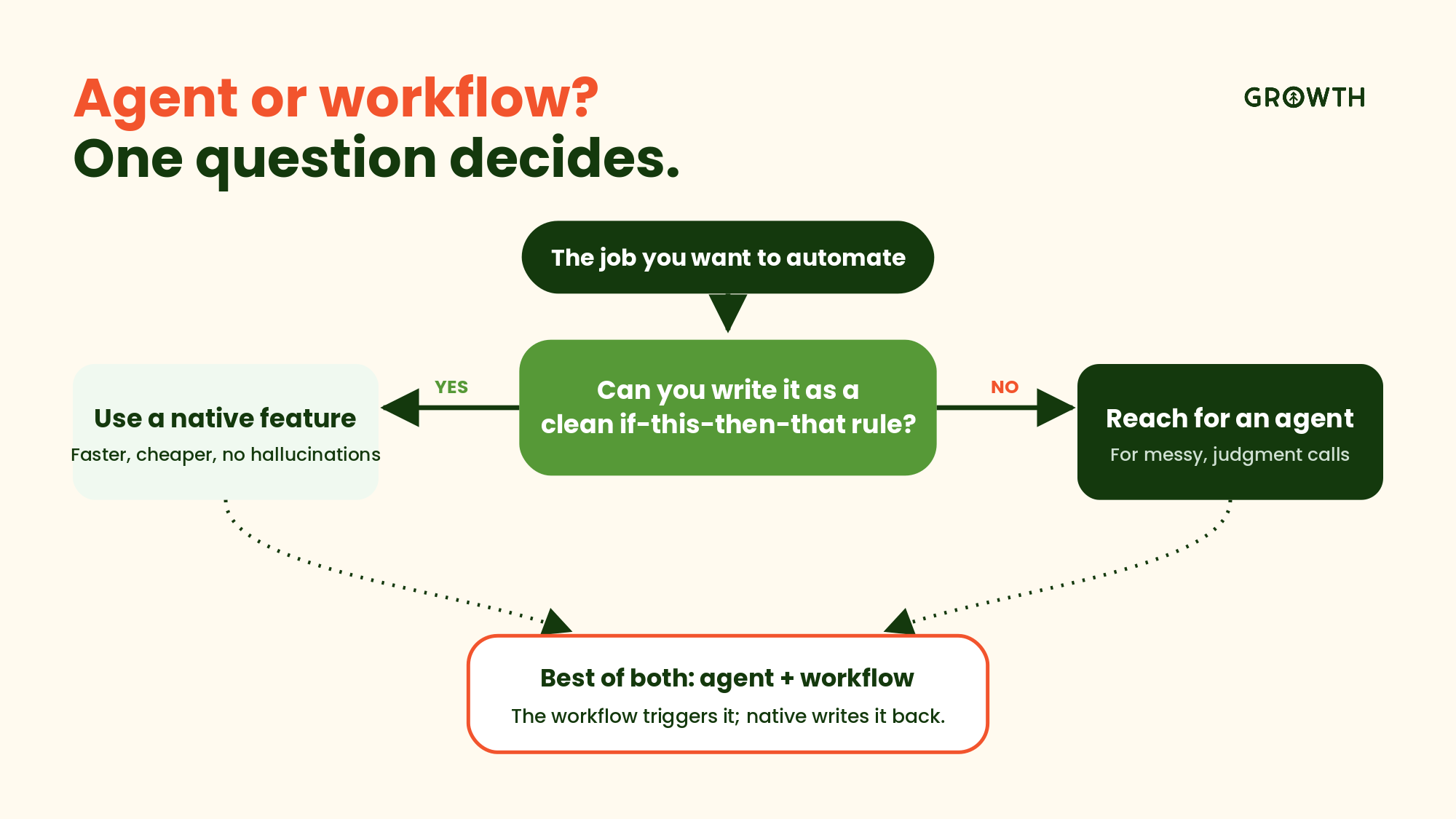
Here's the part I'd tattoo on every ops team's wall: an agent is not always the answer, and reaching for one when a native feature would do is how you burn credits and trust at the same time. Retire before you add.
Use a native HubSpot feature when the job is deterministic — the same input should always produce the same output. A workflow that changes a lifecycle stage when a form is filled. Free enrichment that fills a company record from a business domain. A rotating assignment rule. Native AEO working on your AI-search visibility. These are rules, and rules don't need judgment. They're faster, they're cheaper (often no credits), and they don't hallucinate.
Reach for an agent when the job needs reasoning, unstructured input, or a decision a rule can't express.
-
Reading three call transcripts and writing a pre-call brief.
-
Deciding whether a messy inbound message is a dealer, a buyer, or a support issue.
-
Parsing a vendor catalog into the right SKUs.
-
Drafting outreach grounded in what it found researching an account.
If you can write the rule as a clean if-this-then-that, use a workflow. If it takes a human's judgment to do it well, that's agent territory.
And the honest middle: a lot of the best setups are both — a native workflow trigger fires the agent, the agent does the thinking, and the result writes back through native automation. Use each for what it's good at. Don't make an agent do a workflow's job, and don't ask a workflow to do a human's.
Let's dive in.
Part 1 — Start With the Platform, Not the Shiny Agent
1. See every agent, and what it's producing, on one screen. The whole point of Agent Hub is visibility. The Intro tab shows live status and recent outcomes for every agent, grouped by the goal it serves: build demand, win deals, delight customers, scale growth. Active agents show what they drove. Idle ones show what they'd deliver if you turned them on. For a revenue leader, this is the difference between "we're doing AI" and a screen you can put in front of your board. Start here.
2. Turn on an idle agent in one click. Agent Hub surfaces the agents you're paying for but haven't switched on, with a preview of what each would do. No procurement cycle. See the capability, click Activate, watch the outcome show up on the same screen. Run a controlled pilot instead of a big-bang rollout.
3. Organize AI outcomes by business goal, not by tool. Results group under those four goals rather than by which agent did the work. You stop reporting "we ran the prospecting agent 4,000 times" and start reporting "here's what moved demand." It's the reporting layer scattered agents never gave you.
4. Set run limits so credits don't surprise you. Agent Builder lets you review the estimated credit cost per run and set a monthly limit. This is the control that makes a CFO conversation possible — you cap the spend before you scale the agent, not after the invoice lands.
5. Manage who can edit versus who can run. Every custom agent has access controls: owners and super admins edit, everyone runs, or custom team-by-team rules. Let a rep run an agent without letting them rewrite its instructions. Governance you'd expect from a system of record.
Part 2 — Build Demand (Marketing)
6. Keep your marketing database clean on autopilot. The pre-built Data agent enriches and maintains CRM records so your segmentation and scoring run on something you can trust. Dirty data is the quiet reason campaigns underperform. Fix the records first.
7. Draft campaign and nurture copy grounded in your brand kit. A custom agent pulls your brand kit and ICP definitions from the Context tab and drafts email or landing-page copy that sounds like you, not generic AI. Define the voice once; every agent inherits it.
8. Draft your weekly demand recap from the data. Build a custom agent that reads the week's new contacts, campaign engagement, and pipeline created, then writes a plain-English recap for your team or exec update. The Monday status roundup someone builds by hand, drafted straight from the CRM — grounded in the numbers, ready for a human to shape.
9. Summarize inbound leads before a human reads them. Build an agent that reads a new contact's form fills, page views, and enrichment data and writes a two-line "who this is and why they raised a hand" onto the record. Your team stops opening ten tabs to qualify one lead.
10. Route and prioritize leads by fit and intent. Start native: HubSpot's lead scoring and workflow-based routing already own the deterministic part — score thresholds, round-robin assignment, territory rules. Layer an agent on top for the judgment a score can't express: reading the form-fill notes and enrichment to decide whether a lead actually fits your ICP, then writing a priority tier the routing workflow acts on. The workflow moves the lead; the agent makes the call the rules can't.
11. Turn one asset into many — but reach for Content Remix first. This is my favorite example of "native before agent." Before you build anything, HubSpot's own Content Remix (in Content Hub) already does this: feed it a top-performing blog, webinar, or video and it spins out social posts, emails, landing pages, and shorts in a few clicks. Lean on that first. Build a custom agent only when you need repurposing Remix doesn't reach — say, pulling from a knowledge vault of gated assets and routing each output to a specific deal stage or persona. Native for the common case; agent for the edge.
Part 3 — Win Deals (Sales)
12. Research target accounts and draft the first outbound touch. The pre-built Prospecting agent researches target companies and generates personalized outreach from what it finds. Reps stop losing the first hour of the day to 10-Ks and LinkedIn. It drafts; your reps still decide. Think research analyst who never sleeps, not autopilot.
13. Move stuck deals forward with recommended next steps. Deal progression gives sellers AI recommendations to advance deals — the next step on the deal that's gone quiet, grounded in the actual activity on the record. It works because it can see the deal. Point it straight at pipeline velocity.
14. Prep a rep for every call — start with the Meeting Assistant. HubSpot's native Meeting Assistant (in the Sales Workspace) already handles standard prep: attendee profiles, past engagement, CRM context, and suggested talking points, right where reps schedule. Use it first. Reach for a custom agent when you need a brief the native tool doesn't produce — your exact format, an objection playbook pulled from a knowledge vault, or context stitched from the last three call transcripts and an outside system. Native for standard prep; agent for the edge.
15. Write the post-call summary and log next steps — again, Meeting Assistant first. That same native Meeting Assistant produces post-meeting summaries and AI-suggested next steps (Guided Actions) to keep the deal moving, no build required. Let it do the standard write-up. Reach for a custom agent only when you need something it doesn't — pushing the summary into a specific deal property, posting it to a Slack channel, or kicking off downstream work in another system. Native for the summary; agent when it has to travel.
16. Flag at-risk deals before the forecast call. The hard signals — deal age, last-activity date, stage stalls — are native deal-score and workflow territory; let HubSpot flag those. Point an agent at the soft signal a rule misses: the hesitation in recent notes and call summaries, the buying language that cooled. It surfaces the deals quietly slipping so your forecast is a conversation about reality, not optimism. Rules catch the math; the agent catches the tone.
17. Build the internal handoff when a deal closes. HubSpot's own example: an onboarding review agent that runs after close, reads the contact and company properties, deal details, and recent activity, then produces a clean handoff — customer summary, onboarding considerations, and a flagged list of what's missing or risky. The handoff that always breaks, standardized.
Part 4 — Delight Customers (Service)
HubSpot's pre-built Customer Agent and Service Hub already shine here — tier-one deflection, ticket handling, knowledge-base answers. So the highest-value custom agents in service are the ones that go where the native tools don't: outside HubSpot's own channels, and into the softer signals a ticket never captures.
18. Resolve tier-one support before it reaches a human. The pre-built Customer Agent responds to support conversations and resolves requests across the buyer journey. It clears the repetitive volume so your team spends its hours on tickets that need a person. Deflection you can measure, not "AI does support now."
19. Draft knowledge-base answers from resolved tickets. Point an agent at a knowledge vault of solved tickets and have it draft help articles for the questions that keep recurring. Your docs stop lagging your product.
20. Summarize a customer's whole history before a renewal call. An agent reads the account's tickets, usage notes, and deal history and produces a "state of the relationship" brief, so your CS lead walks in knowing where the landmines are.
21. Catch churn signals in support language. Build an agent that reads ticket sentiment and frequency and flags accounts trending toward frustration — so someone reaches out before the cancellation email arrives.
22. Flag account risk from a customer thread in Slack or email. Connect an agent to Slack (or the inbox) via MCP so it reads the back-and-forth happening outside your ticketing — the frustrated aside in a shared channel, the "we're evaluating other options" line buried in an email thread — then flags the account, notes why, and pings the CSM. The Customer agent works your tickets; this catches the risk that never becomes one.
23. Spot at-risk keywords on customer success calls. Point an agent at your CS call transcripts to listen for the language that runs ahead of churn — "budget review," "not seeing value," "our champion is leaving," "just renewing for now" — and surface a ranked risk list for the CS lead. Sentiment on a support ticket is one signal; what a customer actually says on a call is a louder one.
Part 5 — Scale Growth (Ops & Data)
24. Standardize the manual research task your team does every day. Every company has one — the 15-minute lookup, done over and over, that no off-the-shelf tool covers. Ignite Reading, a virtual literacy tutoring program across 25+ states, built a custom agent that finds and parses each school district's academic calendar using the domain and school year already stored on the deal record. What took 15–20 minutes per district now takes seconds — more than 350 hours a year back. Look for your version: a manual task where the inputs already live in HubSpot.
25. Enforce your naming conventions and data standards. An agent reviews new records against your rules — proper company names, correct lifecycle stage, required fields — and fixes or flags the ones that drift. Data hygiene that maintains itself between audits.
26. Trigger agents off real signals, not calendars. Agent Builder lets an agent fire on a scheduled time, a contact update, a webhook, or a third-party event. Instead of a person remembering to run a report every Monday, the agent runs when the thing that matters actually happens.
27. Test and cost an agent before it touches production. Testing in the builder burns no credits, and you see the estimated cost before you publish. Build, test, price, then scale — in that order. This is the discipline that keeps AI from becoming a line item nobody can explain.
Part 6 — The Fun Part: Agents That Reach Outside HubSpot
Here's where people's eyes light up. A custom agent doesn't have to stay inside HubSpot. Through the Model Context Protocol (MCP), it can connect to external systems — read from them, write to them, both. Add webhooks and integrations and your agent can pull data in from a vendor, push work out to the tools your team already uses, and run itself the moment a signal fires. This is the difference between a smarter chatbot and something that's actually part of your operating system.
28. Turn a Slack message into a HubSpot ticket. Connect an agent to Slack via MCP so that when someone drops a customer issue in a channel, the agent reads it, creates a properly categorized ticket in HubSpot, and links it to the right contact or company. The thing that used to die in a Slack thread now becomes tracked work.
29. Push updates out to Slack when something matters. Flip it around: when a deal closes, an SLA is about to breach, or a high-value account goes quiet, the agent posts the summary into the right Slack channel — with the context pulled straight from the record. Your team hears about it where they already are, without living in the CRM all day.
30. Grab product data from a vendor by webhook. True story: we once worked with a manufacturer who sold paint, and their reps were hand-copying SKUs and color codes out of a vendor catalog every time they built a quote. Slow, and wrong just often enough to be painful. That's a textbook agent job now — a webhook pulls the vendor's product data, the agent matches it to the deal, and the right SKUs land on the record automatically. Any business with an external product feed, price list, or parts catalog has a version of this.
31. Pull pricing or inventory from an external system at quote time. Same shape, different data. An agent reaches an ERP or inventory system through MCP, grabs live availability or current pricing, and writes it onto the deal so the quote reflects reality instead of last quarter's spreadsheet.
32. Enrich records from a source HubSpot won't touch. As I've ranted about before in the Data Chronicles, HubSpot won't enrich a contact's email or phone, ever. A custom agent can reach an outside data source through MCP or a webhook, pull what you're allowed to use, and write it back to the record — filling the gaps native enrichment leaves.
33. Sync a signal from a third-party tool into the CRM. Product usage, a payment event, a support rating living in another platform — an agent can pull that signal in and update the HubSpot record, so lifecycle stage and scoring reflect what's happening everywhere, not just inside HubSpot.
34. Kick off work in another tool when a HubSpot event fires. A deal hits closed-won, and the agent creates the project, the folder, or the kickoff task in whatever system your delivery team runs — no human relay, no dropped handoff.
35. Bring an outside LLM's horsepower into HubSpot — without your team leaving HubSpot. This is the one I love. Through MCP you can put a powerful external model to work behind an agent, and your reps get that intelligence right inside the record they're already looking at. Nobody has to open ChatGPT, paste in context, copy the answer back, and hope they grabbed the right fields. The power comes to where the work already lives.
A fair caveat, because this is still the Chronicles and I'll always give you the catch: every hop outside HubSpot is a connection somebody has to build, secure, and maintain. For your own CRM data, you don't need any of this — agents read it natively. Save MCP and webhooks for when the data genuinely lives somewhere else. Right tool, right job.
Part 7 — Built for the Industries We Live In
These are illustrative — the agents I'd scope for a client in each sector, grounded in what Agent Builder can actually do. And every one of them assumes your data is ready first. That's usually the real work.
Manufacturing and Industrial
36. Parse and standardize distributor and reseller data. An agent normalizes territory, product line, and account tier on inbound partner records, so channel reporting stops being a monthly cleanup project.
37. Draft quote follow-ups on long cycles. For deals that sit for weeks between touches, an agent drafts the check-in grounded in the last conversation and the products quoted — so reps keep dozens of slow deals warm without a spreadsheet of reminders.
38. Turn spec sheets and RFQs into structured deal data. An agent reads an incoming request for quote, extracts parts, quantities, and requirements, and writes them onto the deal, so your estimator starts from structured data instead of a PDF.
39. Pull the right SKUs and specs from your vendor feed. The paint story again, and it applies across industrial: a webhook grabs current product data from your supplier, the agent matches it to the deal, and the quote is built on live SKUs and pricing.
40. Prep field-service and warranty context. Before a service visit, an agent assembles equipment history, past tickets, and warranty status so the tech shows up knowing the machine's story.
41. Route dealer versus end-customer inquiries correctly. A triage agent reads an inbound message, decides whether it's a dealer, a direct buyer, or a support request, and routes it — so the distributor question doesn't sit in the sales queue.
Nonprofit and Mission-Led Organizations
42. Draft donor thank-yous grounded in giving history. An agent reads a donor's gift history, program interest, and last interaction and drafts a personal acknowledgment a human edits and sends. Personal at scale, without the form-letter feel.
43. Summarize a donor's relationship before a major-gift ask. Before the development officer makes the call, an agent assembles the full history — gifts, events, communications, notes — into a one-page brief.
44. Prep grant-report inputs from program data. An agent pulls the activity and outcome data a funder asks for and drafts the first pass of the report, so your team edits instead of assembling from scratch.
45. Re-engage lapsed donors. An agent finds donors who've gone quiet, tiers them by past generosity and likelihood to return, and drafts a message tuned to why they gave in the first place.
46. Keep constituent data clean across programs. The Data agent maintains records across donors, volunteers, and participants — so the same person isn't three duplicate contacts across three initiatives.
Professional Services
47. Build a pre-meeting brief for every client. An agent reads the account, recent emails, and last meeting notes and produces a prep sheet, so senior people walk in ready without an hour of review.
48. Draft scoping and proposal starting points. Grounded in your service catalog and past engagements in a knowledge vault, an agent drafts a first-pass scope for a leader to sharpen. Faster proposals, consistent structure.
49. Summarize engagements for renewal and expansion. An agent reads the project history and flags the natural next engagement, so account growth is proactive instead of accidental.
Education
50. Answer common admissions and enrollment questions. The Customer agent clears the repetitive "what's the deadline, what do I need" volume, so your team focuses on the applicants who need real guidance.
51. Parse institutional data like calendars and terms. The Ignite Reading pattern lands directly here — an agent parses district or institution calendars and terms from data already on the record, saving hundreds of manual hours a year.
52. Nurture applicants through a long decision cycle. A custom agent drafts stage-appropriate follow-ups grounded in where each applicant sits in the funnel, so nobody goes quiet between application and decision.
Part 8 — Where Agents and Workflows Work Together
This is the honest middle I keep coming back to. In Agent Builder, an agent's actions fall into a few buckets:
-
Generate (blog posts, landing pages, personalized variants, proposals)
-
Get data (portal info, keyword analysis, content suggestions, document text)
-
Take action (create a dynamic proposal, discover companies by firmographic data, update form styles)
-
Send a webhook utility
-
Connectors that reach outside tools by MCP — Gong, Notion, Asana, Linear, Amplitude, G2, Zapier.
On their own, they're steps. The magic is wiring them into a HubSpot workflow: the workflow decides when and to whom, the agent does the thinking, and native automation writes the result back. Here's where that combo earns its keep.
53. Personalize an ABM page, fired by a workflow. A target account hits a workflow enrollment trigger; the workflow calls an agent that runs Generate personalization context, then Generate personalized landing page variant and Generate personalized CTA variant for that account. Native publishing pushes it live. The workflow decides who and when; the agent handles the what.
54. Auto-draft a dynamic proposal at the right stage. When a deal moves to your proposal stage, a workflow triggers an agent to Create a dynamic proposal from the deal's line items, contacts, and notes — then a workflow routes it to the deal owner for review. The proposal starts itself; a human still signs off.
55. Feed your ABM list with lookalikes. A workflow or schedule kicks off an agent that runs Discover companies using firmographic data to find accounts resembling your best customers, writes them in as companies, and enrolls them in your ABM nurture workflow. Sourcing and enrollment, hands-off — with a human approving the list before spend.
56. Close the loop with an external system on closed-won. When a deal closes, a workflow fires an agent that assembles the handoff and either uses Send a webhook to kick off work in your delivery tool, or through an MCP connector like Asana, Linear, or Notion creates the kickoff project directly. The handoff travels the second the deal does.
57. Turn call intelligence into pipeline action. Connect Gong MCP so an agent reads the call, pulls the risk signals and next-step commitments, and a workflow writes the tasks and updates the deal. Your call platform stops being the place recordings go to die.
58. Draft the content pipeline, then let native tools finish it. A weekly workflow triggers an agent to Generate content topic ideas and Retrieve blog post suggestions from your performance data, then Create blog post drafts for review. Repurposing the winners into social and email? Back to Content Remix (see #11). Agent for the blank page; native for the remix.
Where I'd Start (a.k.a. Let Me Climb On My Soapbox)
Don't turn on fifty agents in a week. That's how you end up right back where we started — scattered agents nobody's watching.
Turn on the Data Agent first. Confirm your records are actually clean. Then activate one revenue agent tied to a number you're already measured on — prospecting if the problem is top of funnel, deal progression if it's velocity. Prove the outcome on the Agent Hub dashboard where you can see it. Then build one custom agent for the manual task your team complains about most, using the examples above as a starting shape.
Because the point was never "more AI." It's AI with enough context to act well, sitting inside the system you already run, where you can see what it costs and what it returns. That's the part scattered agents never gave you — and honestly, it's the part I've been waiting for since we started these Chronicles.
We'll go deeper on building your first custom agent in the next installment. Until then — what's the manual task your team would kill to hand off? I want to hear it. Come tell me.
Agent Hub and Agent Builder are in public beta for HubSpot Professional and Enterprise customers and use HubSpot Credits. A handful of pre-built agents (Social Post, ABM Landing Page, RFP, Cross-sell/Upsell, and Sales to Marketing Feedback) were sunset on July 23, 2026 and can't be newly installed. Want a hand deciding which agents to activate, which to build, and whether your data is ready for any of it? That's the work we do.